
XCView, a free map service
for
Telegram users.
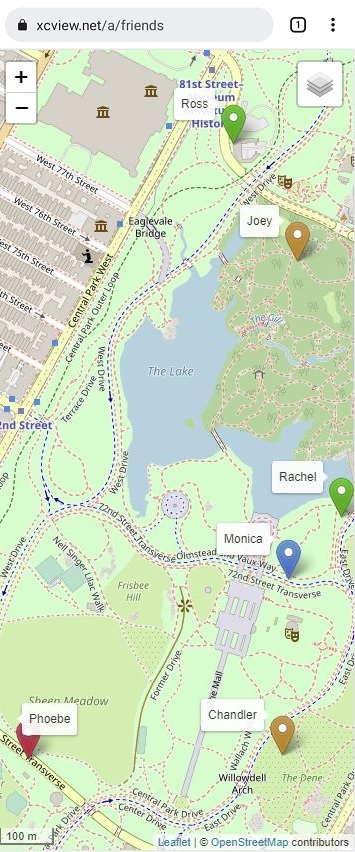
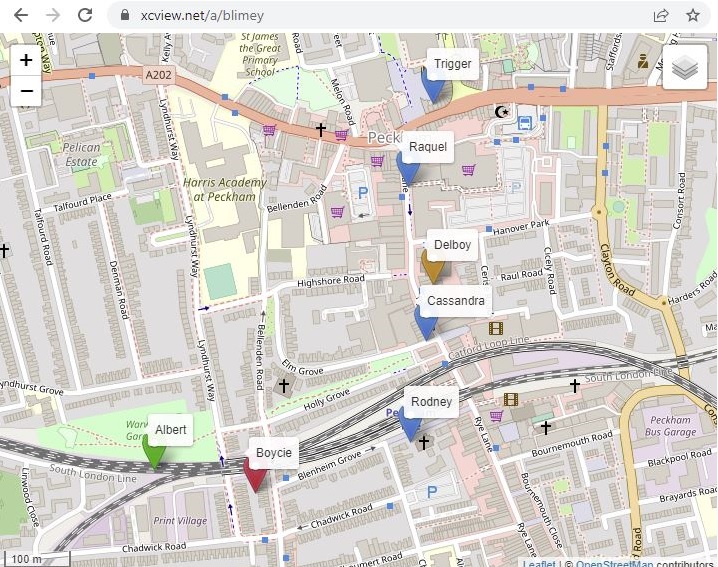
Show group locations on a single map.
XCView is designed for small Telegram groups; typically groups for friends and family. It uses an app within Telegram, called a 'bot', to enable group members to share their locations on a single page map with a unique and temporary XCView web address.

In Telegram access the XCView_bot. (use the QR code or go to
https://t.me/xcview_bot).
To add to a group click on the top bar that says
'XCView Bot' to access the Bot Info panel. Select the menu dots
on the info panel and choose 'Add to Group'.
Within the
group use the /start command to get your map link on xcview.net
and then share your location using the paperclip. Commands are
just normal Telegram messages except they start with a '/'.
The Map only shows the location of group members who
choose to share their location. Members can remove their map
marker at any time.
The map link remains valid until...
- The group member who started the xcview_bot chooses to delete it using the /delete or /stop command.
- You change the map URL using the /setAlias command.
- The link is automatically deleted. This happens after a week of no location sharing.
Commands
Commands are how you interact with the XCView Bot from within Telegram. They are just like normal chat messages except they start with a forward slash '/'. Other than the /start command, which need only be entered by one group member, all commands are optional.
/start
/getURL
/setbgcolour or /setbgcolor
/setalias
/delete or /stop
If you started the bot it also makes the URL invalid.
/help
/setcolour or /setcolor
FAQ
Q: How do I add the bot to my group?
A: Go to
https://t.me/xcview_bot, or use the QR code above, or in Telegram search for XCView Bot.
Once in the bot, click on the top banner/picture which opens the Bot
Info panel. Then click the dot menu on the Info panel and one of the
options is 'Add to Group'. Select that and choose the group to add
to. Once it is added send a '/start' message to the group to get
your Map URL.
Q: Is there a limit to the number of locations per map?
A: No, but response times may increase slightly once you get beyond
a few hundred.
Q: What do the different colour markers mean?
A: Green, Blue, Orange, Red - last updated within 1 minute, 5
minutes, 1 hour, more than 1 hour .
Q: How do I display tracks?
A: We've turned off tracking for the moment. Watch this space.
Q: Do I need to be in a group to use it.?
A: No, you can interact with the bot directly. In fact, that's a
good option if you want selected people to know where you are
temporarily. Just share your live location and send them the map
URL.
Q: Why do you have Aliases.?
A: The default map URL includes the user or group username which is
often known to people outside the chat. Using aliases means you can
set a URL with no obvious connection to the user or group.
Q: How frequently does the live location update.?
A: This seems to vary with factors unknown, but if you're moving at
walking pace it seems to be approximately every 2-3 minutes. If
you're not moving it rarely updates.
Q: Does the map update automatically.?
A: No. For performance reasons we've made it so you have to refresh
the page to get the latest locations.
Q: Do you keep a record of all user locations.?
A: No, just the last two.
Q: Why do you have the setcolour options for labels?
A: Setcolour allows you to share additional information amongst the
group. For instance a kayaking group might ask everyone with a radio
to use a certain colour, or a gliding group might ask retrieve
drivers to set their background colour so they are easily
identifiable to everyone else. Or you agree to use a background
colour of red if anyone needs some help. There are many
possibilities.
Q: How accurate are the GPS positions.?
A: It seems to vary a lot. If you want the most accurate positions
then don't use live locations and wait a couple of seconds for a
good 'lock' before you share your current position. Live locations
seem OK if there is a good signal but equally they can be wildly out
if the signal is not good. We ignore 'live' positions where the
horizontal accuracy is more than 100m, though Android note that the
horizontal accuracy is only right about 70% of the time. We assume
Apple is similar. Horizontal accuracy is not specified for non-live
locations as it is assumed the user confirms the GPS position before
sharing it.